Interview Coder is a technical-interview assistant. Its public product page describes audio transcription for spoken questions. That is a natural starting point when evaluating tools for a coding round.
A small SQL problem reveals a large difference
Interview Coder presents itself around technical interviews and describes support for spoken questions. To evaluate a technical assistant, use a prompt with an answer you can verify by hand. Suppose the orders table contains two purchases for customer A and one for customer B. The interviewer wants the most recent purchase for each customer, including its order ID. A suggestion to select the maximum date per customer is only part of an answer. You still have to return the matching row and decide what happens when two orders share a timestamp.
Follow the rows through the query
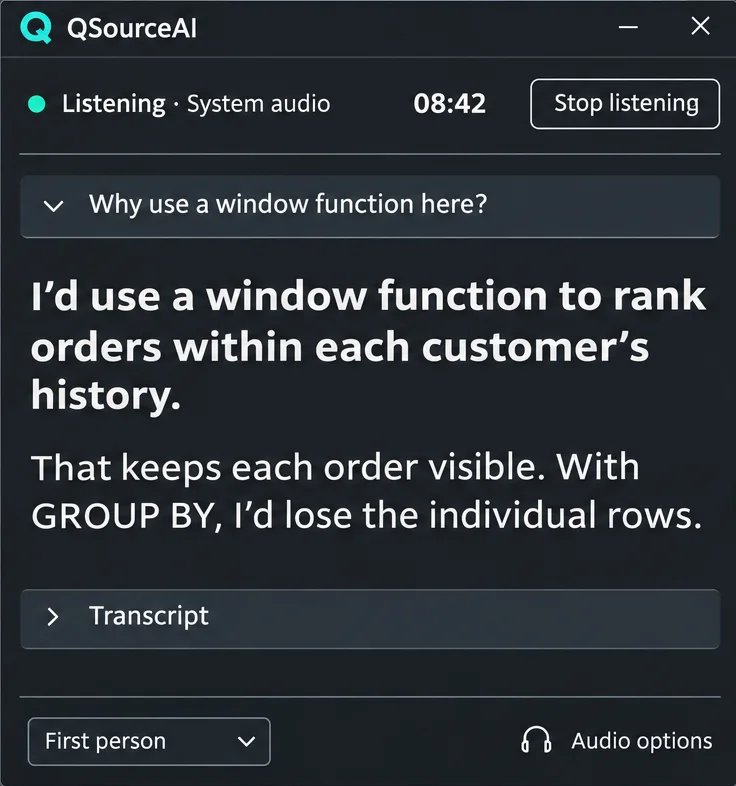
In QSourceAI Pro, capture just the sample table and the prompt. In Main Chat, ask what PARTITION BY customer_id does. The rows stay available while the numbering restarts for each customer. Next ask why the ordering needs both order_time descending and a tie-breaker. If order IDs are unique, an explicit second sort by order_id makes the choice deterministic. Say the business rule aloud: if the interviewer wants all tied orders, selecting one row per customer would answer a different question.
Switch from explaining SQL to defending a choice
Have a partner ask, “Why didn’t you join back to the maximum timestamp?” It is a reasonable alternative. A candidate might answer, “I could do that. With equal latest timestamps the join can return multiple rows, so I chose a row number with an explicit tie rule because you asked for one.” This is where a spoken follow-up and the screenshot serve different purposes. The screenshot preserves the exact schema. The Live Interview reader helps you frame the trade-off in a sentence you can explain.
Choose a test that matches the round
For a coding-heavy interview, try Interview Coder against representative prompts and inspect its explanations on edge cases. If the round also covers your past design decisions, run a second exercise in QSourceAI using a diagram or query alongside your own project notes. In either exercise, change one assumption halfway through. A tool is more useful when you can explain why the original answer must change than when it merely supplies a familiar solution.
Product references
Interview Coder official product overview · QSourceAI interactive demo
A practical example
I’d use ROW_NUMBER to rank orders within each customer’s history. That preserves each order row, so I can show both the purchase and its position in the sequence.
Try this today
Make a three-row orders table with a tied timestamp. Work out the expected output before asking either tool to explain a query.
Before you move on
- The output grain
- A deterministic tie rule
- A clear answer when ties should be retained
Real questions. Answers built around you.
Start with the 15-minute text trial on Windows. Pro adds live audio and screenshot analysis for US$85/month.